Article overview
What changed—and what did notApple introduced App Tracking Transparency (ATT) with iOS 14.5. It requires iOS apps to request permission when using app data to track a person across other companies’ apps and websites for advertising or sharing information with data brokers. ATT does not make all personalised advertising on iOS impossible; its effect depends on permission, the data source and the advertising context.Audit Meta measurement before increasing spendIf you use Facebook and Instagram by Meta on Shopify, review its data-sharing settings and the business assets connected to the store. Shopify documents browser pixel and server-side Conversions API options; the exact collection depends on the selected level and configuration. Choose the level deliberately and keep the customer-facing privacy explanation consistent with it.Build useful search contentStart with the questions customers ask before buying: suitability, sizes, materials, compatibility, delivery, returns and care. Give each product and collection a clear purpose and a descriptive title. Link related guides and products so that visitors can continue naturally from research to purchase.What changed—and what did not
Apple introduced App Tracking Transparency (ATT) with iOS 14.5. It requires iOS apps to request permission when using app data to track a person across other companies’ apps and websites for advertising or sharing information with data brokers. ATT does not make all personalised advertising on iOS impossible; its effect depends on permission, the data source and the advertising context.
For any campaign, ask who receives customer information, why it is collected and which choices a person has. ATT is one part of that picture, not a switch that turns all advertising off. Apple says users can allow or refuse cross-company app tracking and later change the setting; website privacy and marketing consent still need their own review. (Apple ATT guidance)
Some screenshots show earlier interfaces. Use the linked Apple and Shopify guidance for current controls.
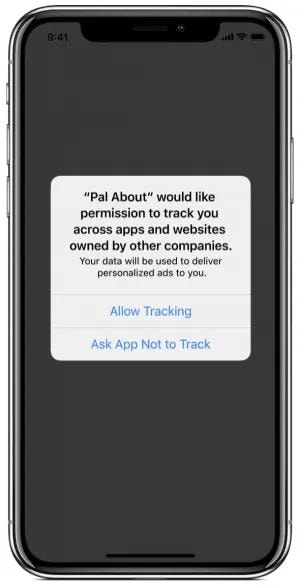
Image from Medium
For a merchant, the practical issue is incomplete observation. An ad click, a store visit and an order may not all be connected in one report. Treat platform attribution as an estimate produced under particular rules, rather than a complete customer history. Do not interpret missing attribution as proof that a channel produced no value.
ATT is an app-level permission framework. A Shopify website’s pixel configuration and website privacy choices are separate settings; merchants should review those independently.
The 2022 third-party ATT illustration shows the issue at the time; it is not a current iPhone settings guide. The adjacent Apple capture and support page explain the current controls. (Apple support)
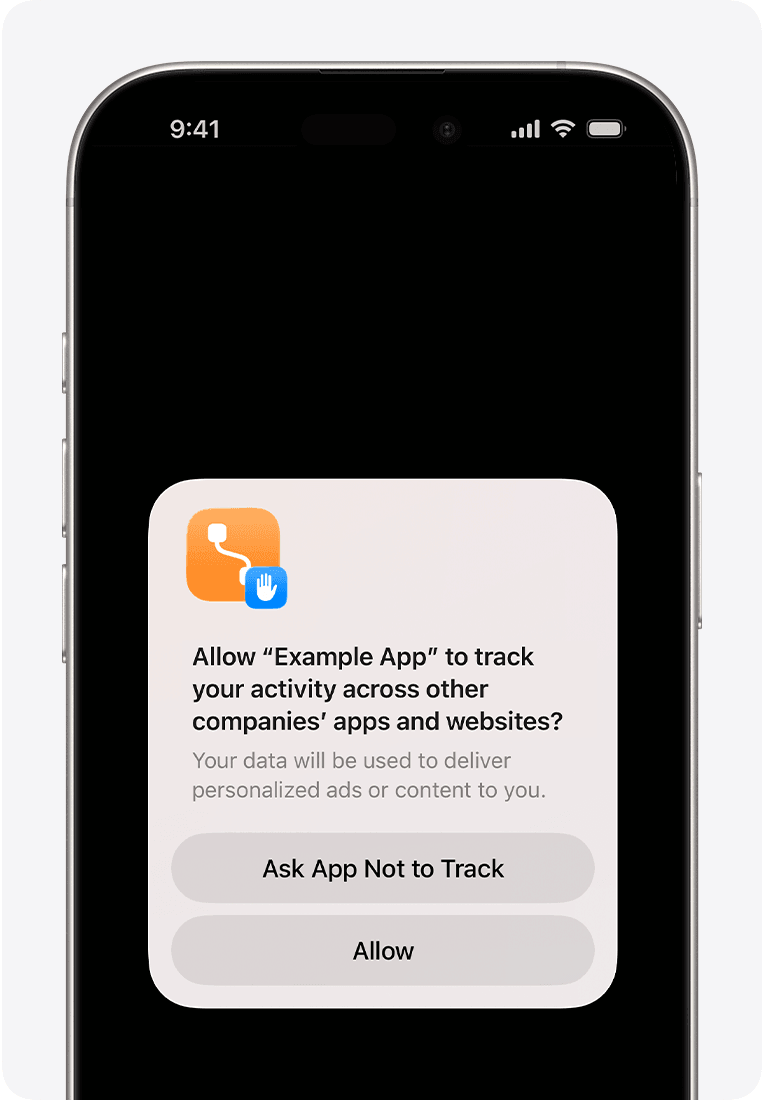
Apple’s example of an iPhone app tracking permission prompt. Source: Apple Support, captured 24 October 2026: https://support.apple.com/en-me/102420
Audit Meta measurement before increasing spend
If you use Facebook and Instagram by Meta on Shopify, review its data-sharing settings and the business assets connected to the store. Shopify documents browser pixel and server-side Conversions API options; the exact collection depends on the selected level and configuration. Choose the level deliberately and keep the customer-facing privacy explanation consistent with it.
Server-side measurement is not permission to disregard consent or platform rules. Test the order journey with your actual consent settings, confirm that a purchase is recorded once, and investigate duplicated events before comparing campaigns. Check that the order value, currency and refund treatment match the question you are trying to answer. A second tracking app can add complexity without adding reliable information.
Write down what each report can actually observe. An ad platform, Shopify Analytics and a payment provider can legitimately show different totals or channel credit because their attribution rules, data feeds and update times differ. Reconcile the underlying completed orders first, then compare campaigns over the same dates and currency. A higher reported return is not by itself higher profit. (Shopify marketing measurement guidance)
Build useful search content
Start with the questions customers ask before buying: suitability, sizes, materials, compatibility, delivery, returns and care. Give each product and collection a clear purpose and a descriptive title. Link related guides and products so that visitors can continue naturally from research to purchase.
Structure and page details
A practical SEO checklist has three parts: make navigation and internal links descriptive, keep pages usable on mobile, and give product pages complete information. Shopify lets merchants edit page titles and meta descriptions; also use readable URLs, helpful headings and concise image alt text. A search phrase belongs where it accurately describes a product or question, not in every sentence. (Shopify SEO guidance)
For a product page, include the exact material, dimensions, compatibility, care, delivery limitations and return conditions that affect a purchase. Link a related guide to the relevant product or collection. Check for broken links and duplicate page purposes before commissioning more articles; a better answer to a real question can be more useful than a larger quantity of thin posts.

Laptop showing website traffic reports during a search-performance review. (Myriam Jessier on Unsplash)
Search optimisation is not a guarantee of rankings, traffic or sales. Avoid repeating keywords mechanically or installing multiple SEO apps that generate competing metadata. Check that the important pages can be indexed and that descriptions are accurate. Use search queries and landing-page behaviour to identify gaps, then improve a small number of high-value pages and measure the result.
Use email as a relationship, not a tracking workaround
Invite people to subscribe with a clear explanation of what they will receive. Shopify’s current guidance is to send promotional messages to customers who agreed to marketing. A shipping email address alone is not the same as marketing permission. Make preferences and unsubscribe options easy to use, and avoid importing lists without a suitable basis.
Plan a useful welcome sequence, product education and relevant replenishment or follow-up messages. Segment with information that is appropriate to use, such as purchases and explicitly supplied preferences. Do not promise that subscribers will convert at a higher rate: the offer, audience and timing still determine performance.
A subscriber list is useful because people deliberately chose to hear from the brand, not because consent guarantees they are qualified buyers. Design a simple branded template with legible text, a clear sender and one relevant action. Examples might be a welcome note, a care guide after purchase, or an announcement about a genuinely related product. Segment only on data you may appropriately use, and keep an unsubscribe path.
If an email platform can tag customers after a purchase or click, test the rule with a small group. Do not infer every subscriber's intent from an open: Apple's Mail Privacy Protection can obscure whether a message was actually opened. Compare clicks, orders, refunds and unsubscribe patterns with the size and quality of the audience.

Phone home screen with multiple apps, illustrating how customers move between channels. (Sara Kurfeß on Unsplash)
Apple Mail Privacy Protection can stop senders from learning whether a message was opened. Email open rates therefore should not be treated as a clean measure of human interest. Compare clicks, purchases, revenue after returns, unsubscribes and deliverability; use opens only with their limitations understood.
Make support part of the shopping experience
A live chat or chatbot is useful when it resolves a real obstacle: choosing a size, confirming delivery or understanding a return. Publish service hours and provide a route to a person when automation cannot answer. Do not let an automated response invent availability, delivery promises or refund decisions.

Customer-service dashboard on a laptop, illustrating live-chat support. (Sigmund on Unsplash)
Review recurring questions and improve the product page or policy that caused them. Track response time and whether the shopper obtained a useful answer. This creates an operational feedback loop rather than simply adding another widget that slows down the storefront.
Design a chat flow around recurring questions. A bot can ask what item a shopper is looking at, surface the published delivery or size guide and hand a complex case to a person with the context preserved. The team should review unanswered questions weekly and update the source page. Set realistic service hours rather than pretending automation is round-the-clock human support.
A manageable monthly review
Reconcile store orders with payment and fulfilment records first. Then compare acquisition cost, contribution margin, repeat purchases and the channels customers report using. Review attribution windows and consent-related gaps before declaring one campaign a winner.
Choose one measurable improvement for the next month, such as clearer delivery information or a more relevant welcome message. Keep a record of the change and its dates. Privacy-aware marketing works best when measurement, customer expectations and the actual buying experience are considered together.
A practical cycle is to select one weak product or collection page, record its search and purchase questions, improve the page, and compare the next period with the same measurement rules. In parallel, review an email segment and a support issue. This keeps SEO, email and service connected to actual customer needs rather than treating them as three disconnected campaigns.